jueves, 15 de octubre de 2009

Implementing CustomVisualStateManagers to see in which visual state is your object

Technology: Silverlight 3.0

Problem: I need to know which method from Silverlight framework changes the VisualState of a control and when.

Solution: Develop a Custom VisualStateManager and override the GoToStateCore method (which is the only method that can be overriden), doing a Debug.WriteLine with Debug information. I decided to write the information on debug instead of setting a breakpoint, because the breakpoint might alter the behavior of the VisualStateManager. Another thing to remember is to call the base method when overriding GoToStateCore.

In order to set the CustomVisualStateManager as the default VisualStateManager to handle the changes, you can set the XAML in this way:

You could also set it through the static method: VisualStateManager.SetCustomVisualStateManager(FrameworkElement,VisualStateManager);

martes, 13 de octubre de 2009

Silverlight 3.0 - LostFocus in Popup Controls

Technology: Silverlight 3.0

Problem: I want to close a Popup when a Custom Control that contains the popup losses focus.

Considerations:

LostFocus is a Routed Event

This means that if a child triggers a lostFocus event, it will bubble up to the parent. I don’t think this makes too much sense because if a focus changed from a child to another child of the same parent, then the parent should not have a LostFocus event triggered (because the focus is still in one of its children)…but that is how it works.

LostFocus and the Popup control

When one of the Children is a popup, the LostFocus event won’t bubble up to Popup the container (This happens for the LostFocus and for other routed events as well).

Example: If I click on tst2.1, and then on tst2.2, the event LostFocus will be triggered for the stack panel SP2, but it won’t trigger for SP1.
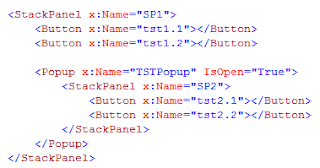

Solution:

There are two things to address, 1) The fact that the LostFocus event will not get to the parent control, and 2) The fact that lostFocus being triggered does not mean that the control lost focus (but one of its children did).

To solve 1), have a panel container inside the Popup, and register to the lostFocus event in that control. You know that all the lostFocus for the popup children will trigger the container LostFocus.

To solve 2), in the LostFocus event for your control, check if the current focused element (FocusMager.GetFocusedElement) is inside your control. You can do this using VisualTreeHelper class.

martes, 6 de octubre de 2009

Binding validation failed because the binding's MsmqAuthenticationMode property is set to WindowsDomain but MSMQ is installed with Active Directory in


Technology: Message Queues with WCF

Problem: After implementing a MQ service with WCF I got the error "Binding validation failed because the binding's MsmqAuthenticationMode property is set to WindowsDomain but MSMQ is installed with Active Directory integration disabled."

Solution: In this case I did not need security, so I just configured the "Security" TAB in a custom binding configuration, setting MSMQProtectionLevel to None and MSMQAuthenticationMode to None.

martes, 15 de septiembre de 2009

Type 'Microsoft.VisualBasic.PowerPacks.LineShape' is not defined.

Technology: Microsoft Visual Basic (migration from VB6.0 to .NET)

Problem: After migrating a VB6.0 to a .NET one, I get the error "Type 'Microsoft.VisualBasic.PowerPacks.LineShape' is not defined". in a machine that does not have the SP1 of VS 2008. After installing power packs 3.0 and restarting the app, I still get the same error

Solution: Download and add reference to power packs 2 ( Microsoft.VisualBasic.PowerPacks.dll ) aparently power pack 3 does not sustitute power pack 2

viernes, 11 de septiembre de 2009

Linq To SQL: Cannot insert explicit value for identity column in table 'table' when IDENTITY_INSERT is set to OFF

Technology: LinQ to SQL

Problem: When inserting a record using LinQ to SQL in a table that has properly defined a column with an autogenerated ID, on submit linq to sql will thow the error:

Linq To SQL: Cannot insert explicit value for identity column in table 'table' when IDENTITY_INSERT is set to OFF

This problem appeared when i was trying to delete all records of a relationship, and adding new ones.
The relationship table had an Id column, which was not set

Solution:
Apparently, linq to sql "mixed" the old records that i deleted with the new ones, so I solved the problem calling "submitChanges" after deleting the records of the relationship and before adding the new ones.

miércoles, 19 de agosto de 2009

Javascript onclick for flash embeded objects

Technology: Javascript-Flash

Problem: I need to execute a javascript function when a flash embeded in a webpage is clicked. When you have a flash object embedded in a website, by default it handles the onclick event and you cannot handle with Javascript.

This is usually solved by programming the event on the flash object, but in this case I am not able to modify the object, because the user can upload new flash objects which I cannot control.

Solution:
1) Set the param wmode to transparent. This allows the object containing the flash to receive the javascript onclick.
2) Use onmousedown insted of onclick. In spite of using wmode transparent, some browsers still wont call the onclick, but they do call onmousedown.
The code looks like this:

<div onmousedown="clickBanner(1)">
<object>
<param name="movie" value="3.swf">
<param name="wmode" value="transparent" />
<embed wmode=transparent allowfullscreen="true" allowscriptaccess="always" src="3.swf"></embed>
</object>
</div>

Note that wmode has to be set in two different ways, because Firefox and IE have different syntax.

Tested on: IE 7, Firefox 3.5 and Chrome.